Design Your Year: The Ultimate Calendar InDesign Template & Planner
There's a unique satisfaction in a well-organized year, laid out in a design that feels both functional and personal. For designers, entrepreneurs, and creators, a calendar isn't just a utility—it's a branding opportunity, a planning canvas, and a potential product to sell. Yet, the blank page can be daunting. Starting from scratch each year consumes valuable time better spent on strategy or creative work. This is where a professional Calendar InDesign Template transforms the process, offering a structured yet flexible foundation to build a polished, custom planner for any year.
A Professional Foundation for Every Project
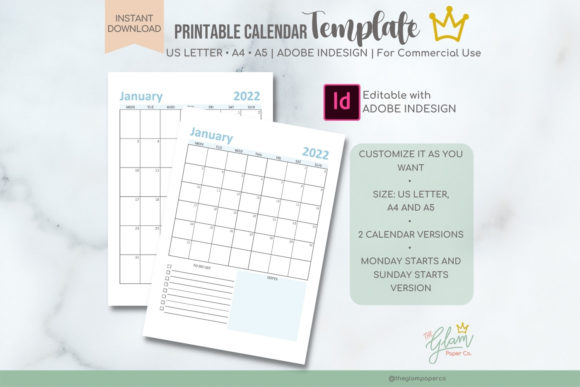
At its core, this Calendar InDesign Template is a set of master pages and styles within Adobe InDesign, designed for three of the most common print and digital formats: A4, A5, and US Letter. The package includes two distinct layout versions for each size—a detailed Calendar with ample space for notes and a cleaner Calendar Simple for a minimalist aesthetic. This duality is key. The detailed version suits project planning, family schedules, or academic use, while the simple version works beautifully as a sleek desk calendar, a brand giveaway, or a digital planner for tablets.
The visual personality of the base template is intentionally neutral and professional. Think clean lines, a balanced grid system, and ample white space. This isn't a loud, decorative design; it's a sophisticated typeface and layout framework meant to be a canvas. Its style leans towards modern typography—functional, readable, and adaptable. The overall appeal lies in its professionalism and the fact that it serves as a robust design asset, saving you the hours of labor required to build a calendar grid, master pages, and paragraph styles from the ground up.
From Personal Use to Commercial Products: Versatility Unleashed
The true power of this template system is its adaptability. It's not just a file you print; it's a starting point for creation. For a small business owner, you can import your brand's color palette and logo, using the calendar as a high-value client gift or an internal planning tool that reinforces your brand identity on every page. A blogger or content creator can design a themed planner—like a "Social Media Content Calendar" or a "Wellness Journal"—and sell it as a digital product on their website.
For designers and marketers, it's a shortcut to producing professional editorial design layouts for clients. Imagine creating a custom annual report insert or a promotional desk calendar for a marketing campaign. The template's structure ensures consistency across all 12 pages, a critical element of professional print design and packaging design. The ability to change every element—fonts, colors, images—means the end product can be as unique as your vision, suitable for personal or commercial use.
Practical Guidance for a Flawless Design Process
Working with this Adobe InDesign template requires basic knowledge of the application, but it dramatically lowers the skill barrier for creating a complex, multi-page document. Here’s how to approach it effectively:
- Evaluate Your Project Fit: Before diving in, decide on the format (A4, A5, or US Letter) and the layout style (detailed or simple). Consider the end use: a wall calendar has different needs than a personal planner kept in a bag.
- Customize with Purpose: Don't just change colors randomly. Use this as a chance to apply a cohesive font pairing. For example, pair a clean sans serif font for the month headers with a highly legible serif font for the dates and notes. This creates clear visual hierarchy.
- Test for Readability: The most beautiful design fails if the dates are hard to read. Print a test page or view it at 100% on screen. Ensure the font size for the day numbers is sufficient and the line spacing (leading) is comfortable for the eye.
- Leverage the Structure: The template includes pre-set paragraph styles. Use them! They are your best friend for maintaining consistency. If you change the style for "January," it will update across the entire document, saving you immense time.
- Understand Commercial Licensing: This is crucial. The template's license allows for creating end products for sale, which is fantastic for entrepreneurs. However, you cannot resell the template file itself. You are selling the unique calendar you designed using the template.
Think of this Calendar InDesign Template not as a finished product, but as a professional toolkit. It provides the reliable, technical foundation—the grids, the master pages, the correct bleed and margin settings—so you can focus your creative energy on what makes the design yours: the imagery, the typography, and the unique purpose it serves for your audience. Whether you're planning your own year or creating a sellable digital product, it’s a practical investment in efficiency and quality.