Water Bottle Mockup Set: Realistic 3D Design Showcase
A Practical Tool for Visualizing Your Brand
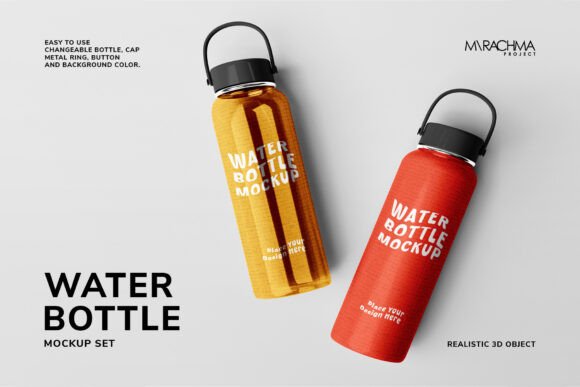
Presenting a product concept to a client or your audience requires more than just a flat design file. You need to help them see it in the real world. That's where a high-quality mockup set becomes invaluable. The Water Bottle Mockup Set is a collection of five realistic 3D object files designed specifically for Photoshop. It’s built for designers, entrepreneurs, and creators who need to showcase branding on a physical product with speed and professionalism.
Unlike generic stock photos, this set gives you full control. The core appeal is its flexibility. You aren't just placing a logo on a static image. You are working with a layered 3D object where every component can be customized. This means you can accurately represent a client's specific brand colors or test different color combinations for your own product line before committing to manufacturing. The result is a presentation that feels authentic and tailored, which builds trust and helps stakeholders visualize the final outcome.
Key Features and How They Save You Time
The true value of any design asset lies in its usability. This mockup set is engineered to be straightforward, even if you're not a Photoshop expert. The files are organized logically, with each customizable element—body, cap, metal ring, button, and holder—on its own layer. Changing a color is as simple as selecting the layer and applying a solid color fill. There’s no need for complex masking or selections.
Adding your own artwork, whether it's a logo, pattern, or full-wrap design, is handled through Smart Objects. You double-click the Smart Layer, place your design, save, and watch it conform to the bottle's contours and lighting automatically. This non-destructive workflow means you can experiment freely without altering the original mockup file.
The technical specifications are built for professional use. The files are 5000x3750 pixels at 300 dpi, providing ample resolution for both digital presentations and high-quality print materials like lookbooks or investor pitch decks. The pack includes five different PSD files, offering various angles and perspectives to create a cohesive set of visuals. A PDF help file is also included, offering guidance if you hit a snag.
Where This Mockup Set Fits into Your Workflow
Think beyond just showing a final product. This Water Bottle Mockup Set is a versatile tool used at multiple stages of a project.
For Brand Identity and Logo Design: When developing a brand identity system, seeing how a logo translates onto a three-dimensional object is critical. This mockup lets you evaluate legibility, scale, and placement in a realistic context. It’s an essential step for any packaging design project, allowing you to refine your display font or sans serif font choice based on how it wraps around the bottle.
For Marketing and Social Media Graphics: Creating compelling content for platforms like Instagram or Pinterest requires visuals that stop the scroll. Using these mockups to create a series of images with different colorways or designs helps maintain a consistent and professional brand identity across your social media graphics. It’s far more engaging than a simple product photo.
For E-commerce and Product Launches: Before investing in inventory, you can create a full product line visualization. Show potential customers or retailers exactly what you plan to offer. This is invaluable for crowdfunding campaigns, online store listings, and sales presentations. It bridges the gap between concept and tangible product.
For Client Presentations and Portfolios: For designers, presenting work in a polished, real-world application elevates your portfolio. It demonstrates an understanding of the entire production and marketing process, not just the digital design phase. It shows you think about visual hierarchy and audience engagement in a practical setting.
Practical Considerations for Your Project
While the mockup is easy to use, a few best practices will ensure you get the most out of it. First, always work from a copy of the original PSD file. This preserves the master file for future projects. Second, pay attention to lighting. The mockup has a built-in light source. When you apply your design, consider how highlights and shadows will affect its appearance. A subtle gradient or shadow effect on your design layer can sometimes enhance realism.
When choosing colors for the bottle components, think about your overall brand identity. The mockup allows you to apply any solid color, so ensure your choices align with your brand palette. Test your design with the provided background options to see which setting best complements your artwork—whether it's a clean studio backdrop or a more contextual environment.
Finally, remember the licensing. The mockup itself is a design asset you can use for commercial projects, but any fonts or images you incorporate into your design must be licensed separately for that use. The preview images are for demonstration only. This is a standard practice for any commercial font or stock image you might use in your final composition.
This set is more than just a template; it's a functional piece of your design toolkit. It solves the common problem of presenting a product idea in a tangible, believable way, saving you hours of rendering time or 3D modeling. For anyone in the business of creating physical products, from custom merchandise to beverage branding, it provides a direct path from your creative concept to a polished, market-ready visual.